



Wordlelator
Wordlelator is fun and adaptable. You can play it at any level and design new game versions based on your talents. This could serve as an ideal training tool for all individuals.
How to Play Wordlelator
Attempt to guess the phrase within the allocated time. Cells will be colored after each guess to indicate how close they are to the correct word. The number of times a user may try to access a limited resource is unbounded. Under the "Advanced" menu you can find further customizing choices. Perhaps your creator left a clue for you. Check to see if the lightbulb is "on." In that case, the author has left a hint for when you're ready to use it. You can close this window right now by clicking the red X. You will be requested to validate your decision. You can challenge friends to a rematch and post your complete performance history on social media after finishing the game.
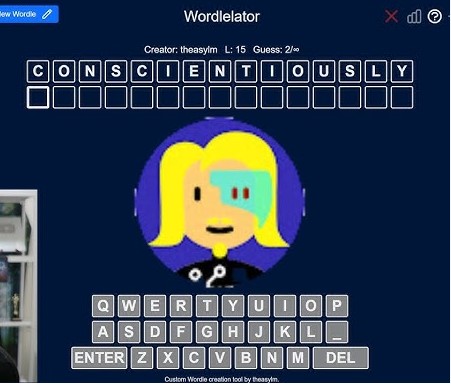
Rules for Wordlelator
- Adaptability for All Skill Levels: Wordlelator is notable for its adaptability, allowing players to tailor the game's difficulty to their level. Wordlelator offers a nice and customized gaming experience regardless of your level of competence with word games—newbie or expert.
- The game's easily navigable UI helps players from many backgrounds to find it more approachable. Wordlelator's easy use, thanks to its straightforward design, helps to explain its appeal among a broad spectrum of users.
- Wordlerator offers a special and practical tool: color-coded feedback bubbles. These boxes contain clues to assist players in improving their guessing accuracy. Each color represents a separate hint.
- Green Clue: Indicates that the letter (N) in the target word is in the correct position.
- Yellow Clue: Indicates that the letter (U) appears in the word but in a different position.
- The grey clue indicates that the letter (P) does not appear in the target word.
Features of Wordlelator
- Customizable Difficulty: Players of various skill levels can adjust Wordlelator's difficulty to match their talents, making it an excellent exercise tool.
- Color-Coded Input: The color-coded tiles offer useful input, allowing you to judge the accuracy of your estimates.
- Creator's Hint: The ability to receive hints from the creator provides extra help if necessary.
- Flexible Guessing: The game adjusts to your pace and tastes, with the number of guesses and the availability of suggestions adapted to your enjoyment.
Controls
- Players participate in the challenge by moving and following directions with their mouse. Good fortune!
Word Guessing: Wordlelator.
- Begin by inputting a word guess corresponding to the target word's length. Your guess may consist of letters, with each letter corresponding to one of the vacant spots indicating the goal word.
- Color-coded tiles provide for feedback. After you submit your guess, "Wordlelator" delivers feedback in the form of color-coded tiles. Each tile represents a letter in your guess, and the colors indicate:
- Hint: Monitor the light bulb icon. If it's "lit up," it signifies the developer has included a tip to help you solve the problem. Hints can be useful in narrowing down the options and determining the correct word.
- Give Up: Should you choose to give up on a puzzle, just click the red X. Before letting you access the next task or retry the current one, the game will ask you to verify your choice.
Similar Games
A game encouraging word recognition, deduction, and logical thinking is "Wordlelator". For those who value word puzzles and brain teasers, it presents a lighthearted challenge. Understanding the mystery word depending on the color-coded tiles is essential for the game.